
|
|
|
|
|


Activating EPS
- From the Vision front screen, select Options – Setup.
- Select the System tab.
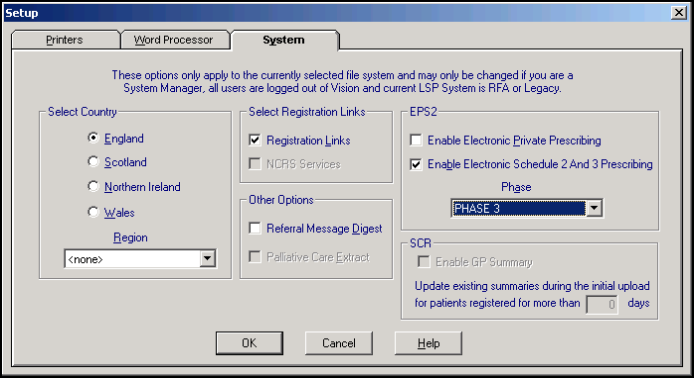
- In the EPS2 section, complete as follows:
- Enable Electronic Private Prescribing - Do not tick as it is not yet permitted to send private drugs via EPS.
- Enable Electronic Schedule 2 And 3 Prescribing - You cannot update this option manually. Once the ability to issue acute and repeat schedule 2 and 3 controlled drugs can be sent via EPS it will be updated automatically.
- Phase - Select from
- Phase 3 (Deployed Disabled) - Dual electronic and paper prescribing where the paper is the legal entity.
- Phase 3 - Also known as EPS Release 2. Electronic prescription with token. The message is the legal entity. Your practice cannot be enabled for this functionality until you have been instructed by your CCG, who need ministerial approval, to go ahead.
- Phase 4 - By default, prescription is electronic only. The message is the legal entity and you will be able to send prescriptions irrespective of nomination. Activation details for Phase 4 to be confirmed by NHS Digital.
 Note – Settings saved in Options – Setup - System are practice wide.
- Select OK to save the changes.

