
Send an Electronic Referral Letter on Behalf of Your GP by Admin Staff
To write a referral letter, the GP must have completed an appointment request, but may not have made a booking of date and time. The GP should write the referral letter or they may have dictated the referral letter for a practice administrator to enter on their behalf.
Building the Referral Letter contents
- From Consultation Manager, select the patient required.
- Select List - Referrals and find the referral item.
- Right click on the referral and select Edit.
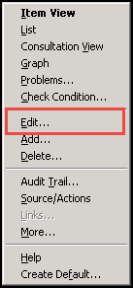
- The Referral - Update screen is displayed.
- You may now create a letter in the usual way, select Letter
 , select a template and complete the letter. A red tick is displayed on the Letter button
  once the letter has been completed.
 - Select OK.
- Drag the newly created letter from the Journal into Accompanying Documents on the Referral Message Digest.
- Select Send on RMD to send the referral.

