
|
|
|
|
|


Settings in Mail Manager
GP2GP messages can be allocated to either the patient's registered GP or be left as unallocated so they can be dealt with by an admin staff who has rights to see unallocated mail.
To specify message allocation:
- From Mail Manager
 , select Tools - Options.
 - Select the Message tab:
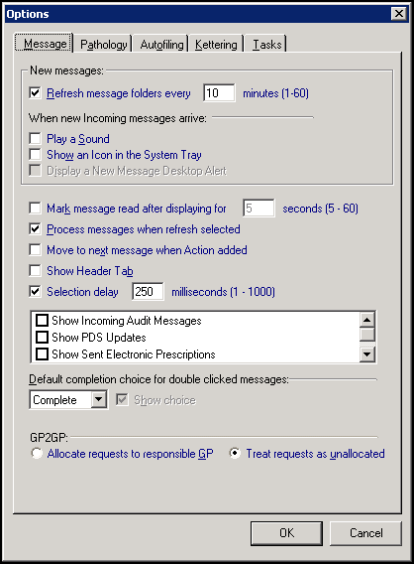
- Now, from the GP2GP section, select the mailbox GP2GP messages should go to:
- Allocate requests to responsible GP - The mailbox of the patient's registered GP
- Treat requests as unallocated - Leaves the GP2GP message unallocated, see Add Access Rights to Unallocated mail.
- Select OK to save and close.

