Logging in to WCCG from Consultation Manager
Important - You must have your WCCG account details which are provided by your Local Health Board (LHB)/ Digital Health and Care Wales Primary Care Service Desk to log in. They maintain user names and passwords and any queries regarding these should be directed to the Primary Care Service Desk in the first instance.
To log in to WCCG:
- From the Vision 3 front screen, select Consultation Manager.
- Select Summary - WCCG:
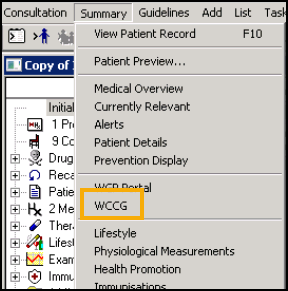 Note - You can log in to WCCG without having to open a patient record.
 - The WCCG Gateway Logon screen displays:
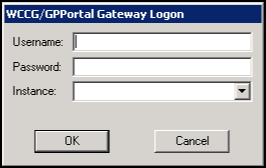
- Enter your Username and Password.Note - The first time you login to WCCG you must change your password for security purposes. First, type in your current password, then your new password, re-enter the new password in Confirm New Password and finally select Update Password.
- Select OK.
Your log in details are stored in Vision 3 so that the next time you access WCCG through Consultation Manager, you are automatically logged on.
Note - You should change your password when prompted via your Vision 3 log in and not in the stand alone application.
General WCCG Information
- You should check the WCCG Information pane regularly for any important information.
- When your password expires there is grace period, followed by a warning period, during which time you should enter your new password.

