Activating Electronic Prescription Service (EPS)
To activate Electronic Prescription Service (EPS):
Important - System settings are practice wide.
- From the Vision 3 Front Screen, select Options - Setup.
- Select the System tab:
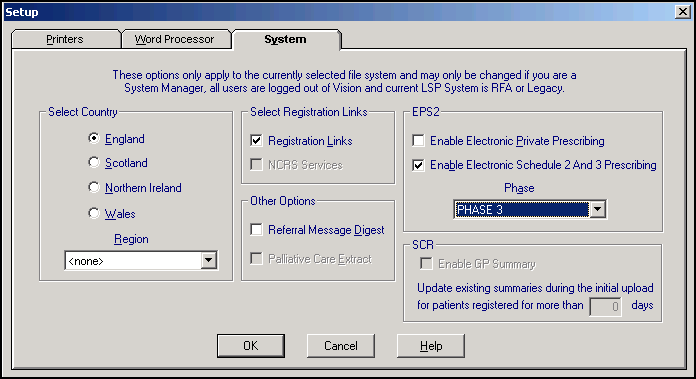
- Complete the EPS2 section as follows:
- Enable Electronic Private Prescribing - Leave unticked, it is not yet permitted to send private drugs via EPS.
- Enable Electronic Schedule 2 And 3 Prescribing - Ticked by default to enable the sending of schedule 2 and 3 controlled drugs.
- Phase - Select from:
- Phase 3 (Deployed Disabled) - (Also known as EPS2 Phase 3 (Deployed Disabled)) Produces dual electronic and paper prescribing where the paper is the legal entity.
- Phase 3 - (Also known as EPS Release 2). Produces electronic prescriptions with tokens. The message is the legal entity. Note - You must ensure you have ICB permission to select Phase 3.
- Phase 4 - Do not select.
-
Select OK to save.
Note – To print this topic select Print  in the top right corner and follow the on-screen prompts.
in the top right corner and follow the on-screen prompts.
