Subscribing to a Formulary
To utilise a Cegedim Healthcare Solutions FMT formulary when prescribing medication, you must subscribe to it.
Note - You cannot edit formularies created by third parties, for example, a formulary created and maintained by a Health Board.
To subscribe to a formulary:
-
From Cegedim Healthcare Solutions FMT, find the formulary you want to subscribe to.
Note - Formularies you have not yet subscribed to, display as Unsubscribed. -
Select Options
 .
. -
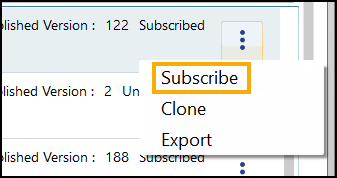
Select Subscribe:
-
Close Cegedim Healthcare Solutions FMT.
Must now allocate access rights to members of staff, see Managing FMT Access for details.
See the Cegedim Healthcare Solutions FMT Help Centre for details of creating and maintaining your own formularies.
Note – To print this topic select Print  in the top right corner and follow the on-screen prompts.
in the top right corner and follow the on-screen prompts.
