Registering a Patient for GP2GP - Wales
Before registering a new patient, search for them on Vision 3 using their date of birth to ensure they have not been registered with your practice in the past. A GP2GP record transfer does not occur for re-registering patients as it would result in duplicated records.
Training Tip - From Registration, use Action - Re-Registration to re-register a patient.
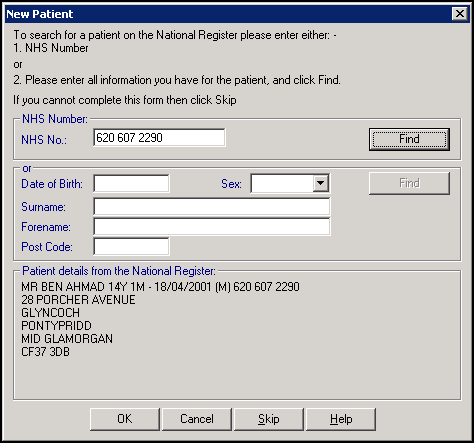
Locate the patient from the Welsh Demographic Service (WDS), using either:
- Their NHS Number:
- or, by an Advanced Search using surname, date of birth and gender:
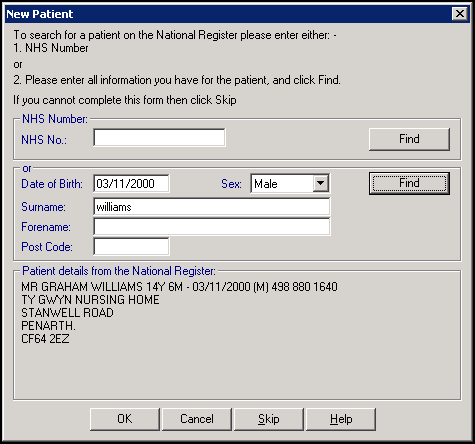
Important - If the patient that displays in the bottom part of the New Patient screen is not the patient you require, try different criteria. If, after multiple searches, you can't locate them, select Skip to skip the GP2GP process.
Providing the following criteria is met, a GP2GP Request message is automatically sent to the previous practice:
- You use Vision 3 via the Wales AEROS managed service.
- The patient is transferring from another Welsh practice.
- The patient has not been registered with you in the past, for example, a re-registration.
- The WDS lookup is completed.
- The Data Transfer Service (DTS) is functional. This is the method by which messages are transferred. If the service is down, a message displays.
- Both your and the patient's previous practice are GP2GP enabled. If this criteria is not met, a message displays.
Note - To print this topic select Print  in the top right corner and follow the on-screen prompts.
in the top right corner and follow the on-screen prompts.
