Signing Out
To sign out of Formulary Management Tool:
-
To close Formulary Management Tool but to leave it running in the background, select Close
 from the top right corner of Formulary Management Tool.
-
To sign out of Formulary Management Tool or all OneAdvanced applications using the Windows System Tray:
-
Select the System Tray Arrow
 and right click the Vision logo.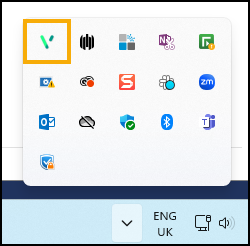
-
The Vision menu displays, select either:
-
Sign Out to close all OneAdvanced applications
-
Formulary Management Tool - Quit to log out of Formulary Management Tool
-
-
Note - To print this topic select Print  in the top right corner and follow the on-screen prompts.
in the top right corner and follow the on-screen prompts.