Alcohol Volume Calculator
The Alcohol Volume Calculator is used to find out how many units there are in a single drink or in a number of drinks.
Accessing the Alcohol Volume Calculator
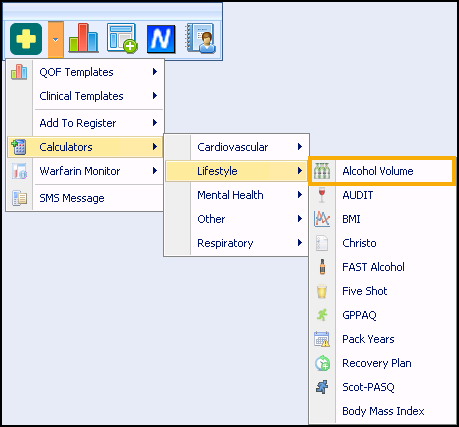
- From Consultation Manager, select Vision+ from the floating toolbar and select Calculators - Lifestyle - Alcohol Volume:
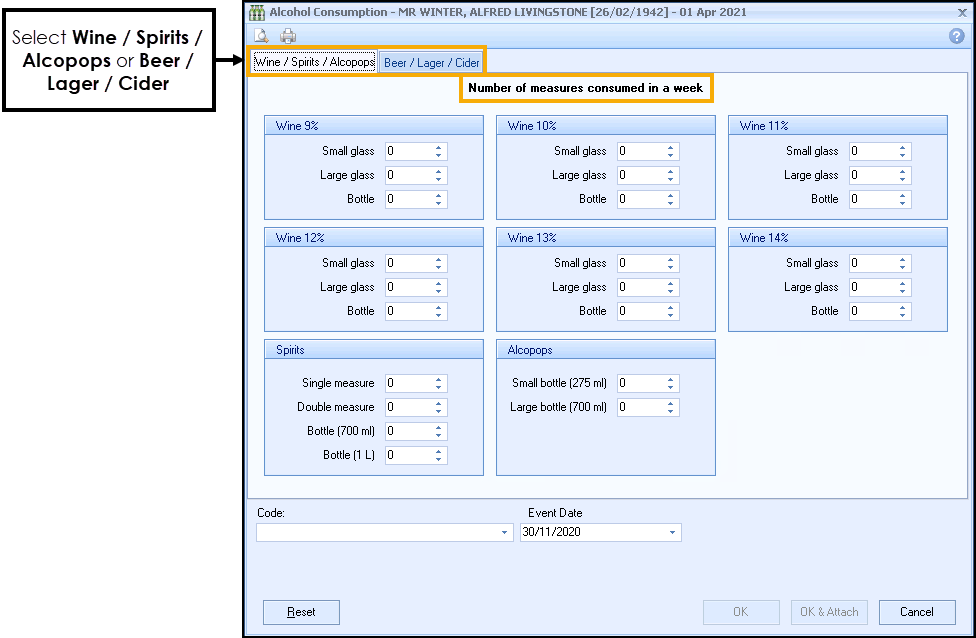
- The Alcohol Volume Calculator displays:
-
Select either the Wine/Spirits/Alcopops or the Beer/Lager/Cider tab.
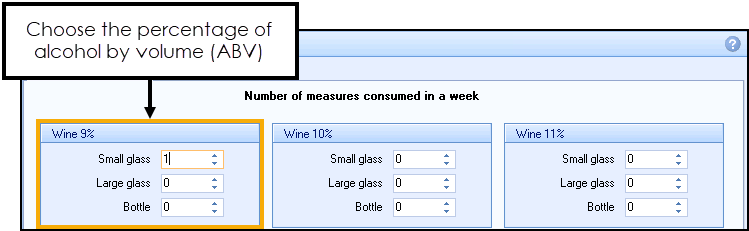
- You can now select the percentage of alcohol by volume (ABV) for example 9% and the amount consumed:
- The Clinical term, Event Date and Score automatically display at the base of the screen. Select OK
 to record the data or OK and Attach
  to also record the questionnaire:
- The score is recorded as part of the Alcohol Structured Data Area (SDA) and is shown in the Units box:

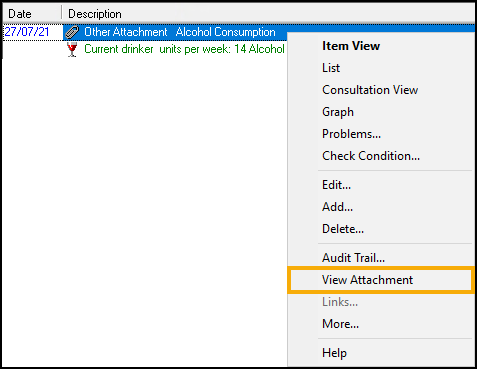
- To view an attachment, from patient's record, right click on the attachment entry and select View Attachment. The attachment displays as a PDF:
Note - To print this topic select Print  in the top right corner and follow the on-screen prompts.
in the top right corner and follow the on-screen prompts.