Emergency Care Summary - Northern Ireland
The Emergency Care Summary (ECS) is a subset of GP data held centrally in the SCI Store for every non-dissenting patient. It is intended to provide data for use in care contexts where clinicians do not have access to the core GP record, for example, Out of Hours, A&E.
To access the ECS Summary Management Summary screen:
- From Consultation Manager select the patient required and open a consultation if one does not open automatically.
- Select List - ECS Management Summary and the ECS Summary Management screen displays.
- Select the Emergency Care Summary tab:

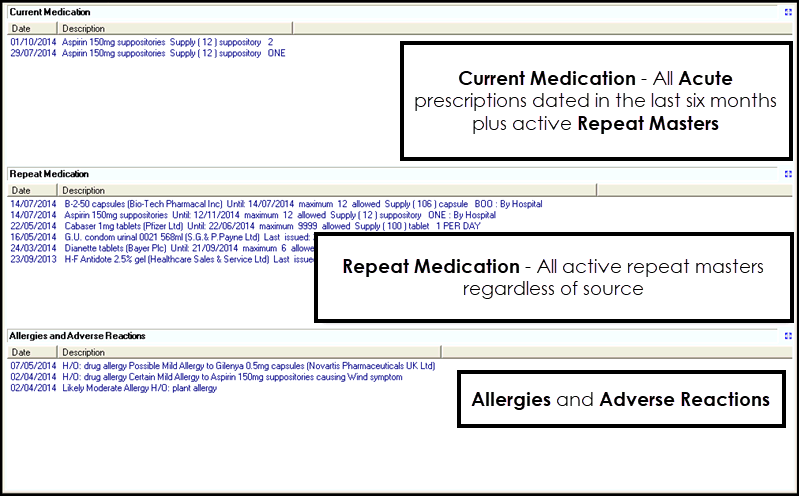
- The following sections display:
- Current Medication -
- All Acutes issued dated in the last 6 monthsNote - Before the ECS Management screen is enabled, Repeat items that are prescribed out of practice are not automatically included in an extract for ECS. This is addressed once the ECS Management screen is switched on and all active repeats regardless of source are extracted.
- Active Repeat Masters
- All Acutes issued dated in the last 6 months
- Repeat Medication
- Allergies and Adverse Reactions
- Current Medication -
- To expand the information displayed in any section, select Expand
 .
. -
Select Close to close the expanded window.
Note - It is not possible to add data from here.
Note - To print this topic select Print  in the top right corner and follow the on-screen prompts.
in the top right corner and follow the on-screen prompts.