Switching Off the Automatic Start-up
Vision Anywhere contains an automatic start up, on install, this is set to open Vision Anywhere when you start up your workstation. This is designed to act as a Business Continuity service in the unlikely event of your clinical system being unavailable. Although it is not recommended, you can switch it off for your log in, to switch off the automatic start, you can either:
- From your taskbar, select the System Tray Arrow
 and right click the Vision logo: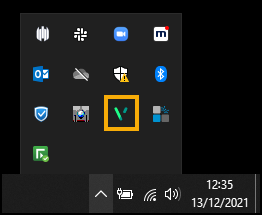
The Vision menu displays:

Select Vision Anywhere and remove the tick from Autostart.
Note - You can use Quit to close Vision Anywhere from here if required.
Or
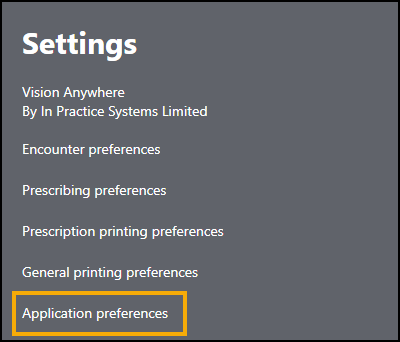
From Vision Anywhere, select your name and then Settings:

From Settings, select Application preferences:
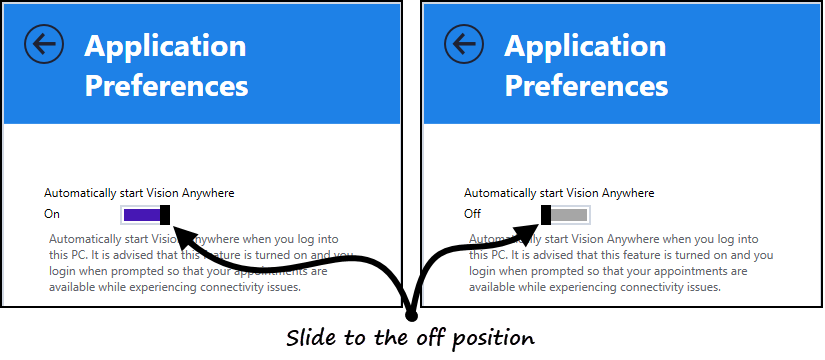
The Application preferences screen displays, using the slide bar, change Automatically start Vision Anywhere to Off:
Select the Back Arrow
 to close.
Note - To print this topic select Print  in the top right corner and follow the on-screen prompts.
in the top right corner and follow the on-screen prompts.