The Appointments List
Selecting and Viewing Patient Information (2:10)
The Vision Anywhere Home screen automatically displays your next booked appointment and a list of appointments in today's current/next session. Whenever you have an active internet connection, patient records for all of today's appointments automatically download to your device for offline use.
Next Appointment
Your next appointment displays with the booked time and a countdown, along with patient demographic information. The Map  plots the patient's address in Maps:
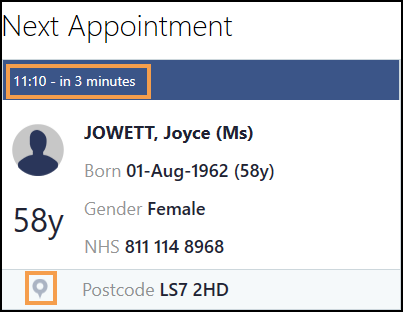
Select the tile to open the patient record.
Appointments
The Appointments list, on the Vision Anywhere Home screen, initially displays your current/next appointment session:
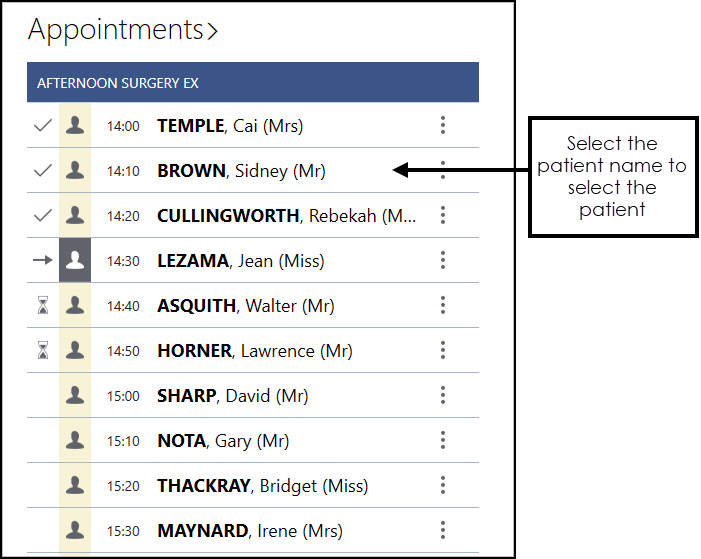
The Appointment Status, Time, Patient name and Title display, the symbols to the right of the name indicate:
-
 Patient record downloaded - Select to access demographic details, DNA information and patient notes, for example, needs wheelchair access.
 -
 Appointment comments - For example, reason for appointment.
 -
 Patient record not yet downloaded
 -
 No NHS / CHI number - If a patient does not have a valid NHS/CHI number their record cannot be downloaded, therefore no symbol displays.
 -
 Special Booking - Appointment booking for a non-registered patient. If you are in a shared care setting, patients from a practice without a sharing agreement are added as special bookings.
The Status displays to the left of the appointments slots:
-
 Booked appointments slot
 -
 Patient seen
 -
 Patient waiting
 -
 DNA
DNA -
 In consultation
 -
 Overdue Appointments - Indicates the number of minutes the appointment is running late
 -

 Specific appointments slots - Defined by your practice, for example, Emergency or Telephone appointments, select the slot to display the description.
 -
 Available appointment slot
Select the Appointments heading to access the last 7 days and next 7 days of your appointments book.
 in the top right corner and follow the on-screen prompts.