|
|
|
|
|


Track the GP2GP Request in Mail Manager
You can track the progress of a GP2GP Request and Record Transfer from Mail Manager  .
.
You may not see all the messages listed below as some pass by quickly, and unless you have the Mail Manager - Tools - Options - Message tab ticked for Show Incoming Audit Messages and Show PDS Updates (and we recommend that you leave Show PDS Updates unticked in order to make the screen less cluttered), they are not displayed.
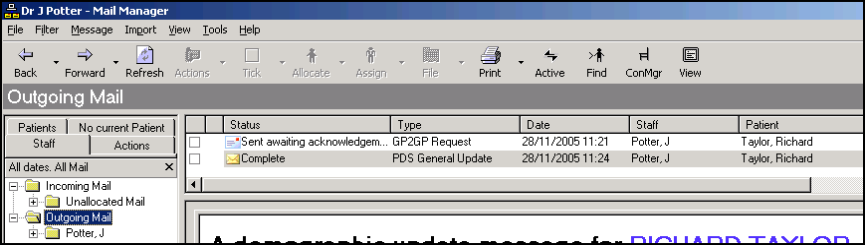
Once a new patient has been registered and the GP2GP process started, there are two messages in Mail Manager - Outgoing Mail:
- A PDS General Update message:
- Initially and briefly has a status of Sent Awaiting Acknowledgement.
- Once the PDS Success message is received, a status of Complete is displayed. Even if the subsequent GP2GP transfer fails, the PDS Update is still sent to the spine to update the registered GP.
 Note - A GP2GP Request message is only sent if the PDS Update is successful. If it is not successful, then no request is sent. However, if the PDS Update goes into Transmission Error, try reprocessing it by right clicking and selecting Reprocess, if then successful, the Request is sent on receipt of the successful response.
- A GP2GP Request message:
- Starts with a status of
 Sent awaiting acknowledgement (the request for the notes has been sent, and the practice are now awaiting acknowledgement of this request). After that, there is a sequence of messages which track the outgoing GP2GP Request. In some cases, these happen so quickly you may miss some stages. A summary of messages is given in Summary of Mail Manager Messages - New patient registering.
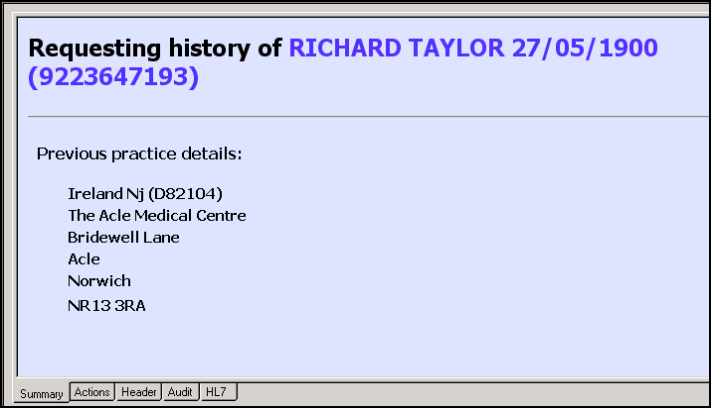
 - It is then updated to Complete. On the Summary tab the previous practice details are displayed. No action is needed. (although if necessary, you can chase things up with the CCG).
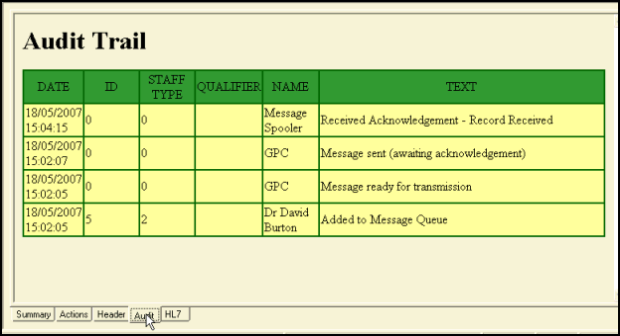
The succession of messages is displayed on the Audit tab of the message.