Creating an Emergency Dialogue
You can create an Emergency Dialogue message in SCI Gateway in one of two ways:
-
Patient Context where you select the patient in Vision Anywhere first.
-
Practice Context where you do not select the patient in Vision Anywhere first.
Select a context below to expand the details:
 Creating an Emergency Dialogue in Patient Context
To create an Emergency Dialogue in patient context:
-
From Vision Anywhere, select the patient required in the usual way
-
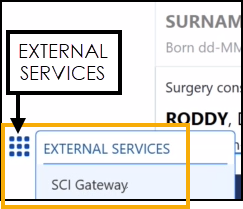
From the Vision Anywhere , select EXTERNAL SERVICES - SCI Gateway.
-
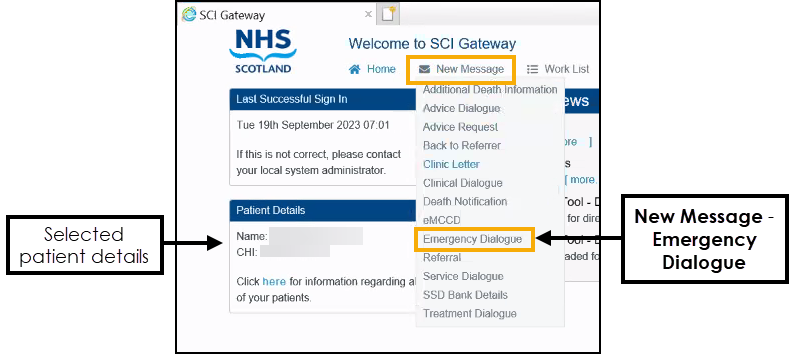
The Welcome to SCI Gateway screen displays with the selected patient's details just above the SCI News section. From the available list, select New Message - Emergency Dialogue.
-
The New Emergency Dialogue screen displays, complete as appropriate and select Create.
-
The SCI Gateway Emergency service screen opens in a separate browser screen, select Maximise
 to expand if required and complete the details as required.
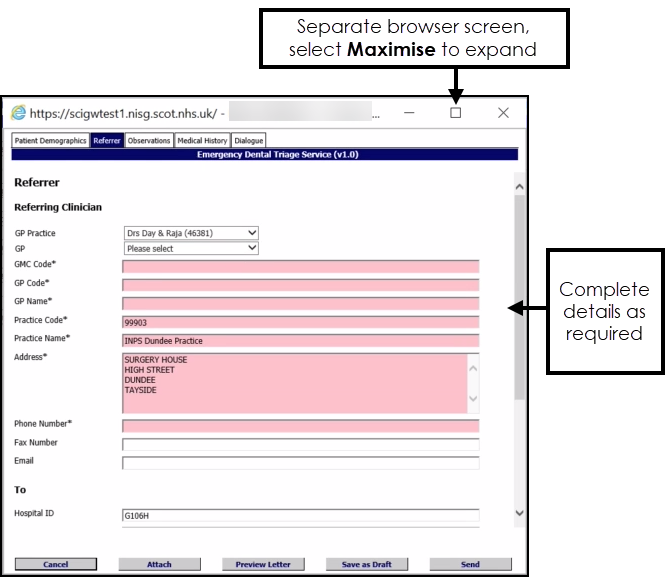 Training Tip - Mandatory areas display in pink on each tab. For more information, please access Help from within the SCI Gateway.
 -
Select Send.
-
A ‘The message has been saved as draft. Do you want to send it and make no further changes?’ message displays, select Yes to confirm all details are correct. If in doubt, select No and check the referral.
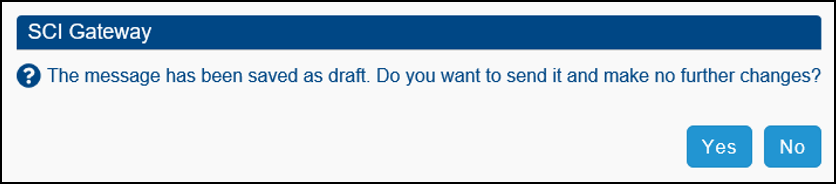
The 'Saving emergency dialogue message to an encounter, please wait' message displays. Once saved, this updates to 'Emergency Dialogue successfully saved', and your Emergency Dialogue Work List displays containing your new entry.
Training Tip - You can select any message from here to display the Emergency Dialogue screen within a separate browser screen. -
From the SCI Gateway Welcome screen, select Sign Out.

-
Finally, select the Back Arrow
 to return to the patient record.
To view the Emergency Dialogue added via SCI Gateway, select the patient in the usual way
-
Patient Summary in the Encounter section.
Training Tip - Select Encounter to view the All encounter screen. -
Patient Summary in the Recent Correspondence section.
Training Tip - Select Recent Correspondence to view the Correspondence screen.
Creating an Emergency Dialogue in Practice Context
To create an Emergency Dialogue in practice context:
-
From the Vision Anywhere , without selecting a patient, select EXTERNAL SERVICES - SCI Gateway.
-
The Welcome to SCI Gateway screen displays with a summary of your messages and draft messages just above the SCI News section. From the available list, select New Message - Emergency Dialogue.
-
The New Emergency Dialogue screen displays, complete as appropriate and select Create.
-
The Vision Anywhere Patient Search screen displays, select your patient in the usual way
-
The SCI Gateway Emergency service screen opens in a separate browser screen, select Maximise
to expand if and complete the details as required.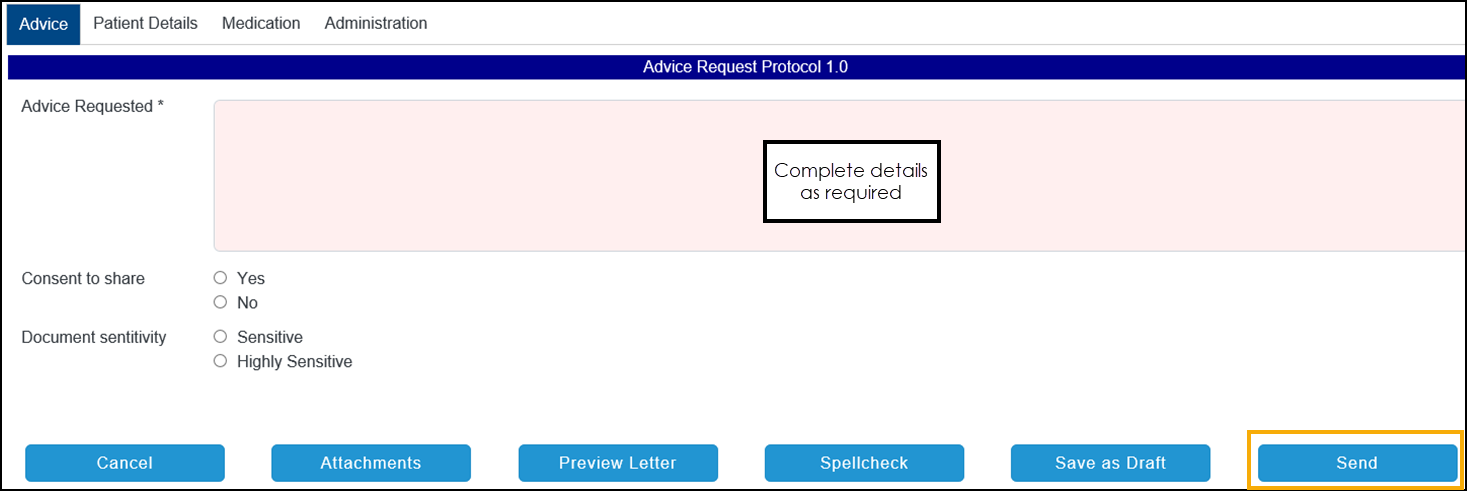 Training Tip - Mandatory areas display in pink on each tab. For more information, please access Help from within the SCI Gateway.
 -
Select Send.
-
A ‘The message has been saved as draft. Do you want to send it and make no further changes?’ message displays, select Yes to confirm all details are correct. If in doubt, select No and check the referral.
The 'Saving emergency dialogue message to an encounter, please wait' message displays. Once saved, this updates to 'Emergency Dialogue successfully saved', and your Emergency Dialogue Work List displays containing your new entry.
Training Tip - You can select any message from here to display the Emergency Dialogue screen within a separate browser screen. -
From the SCI Gateway Welcome screen, select Sign Out.
-
Finally, select the Back Arrow
to return to the patient record.
To view the Emergency Dialogue added via SCI Gateway, select the patient in the usual way
-
Patient Summary in the Encounter section.
Training Tip - Select Encounter to view the All encounter screen. -
Patient Summary in the Recent Correspondence section.
Training Tip - Select Recent Correspondence to view the Correspondence screen.
 in the top right corner and follow the on-screen prompts.